4800 x 1200 dpi, Custom Size: Width: 4" - 8.5" / Length: 6" - 26.6", 4" x 6", 5" x 7", Letter (8.5" x 11"), Legal (8.5" x 14"), Grayscale: 16-bit/8-bit Color: 16-bit/8-bit Per Color
Key Features
- PRINT, COPY, SCAN, FAX: the PIXMA TR4720 is a true 4-in-1 printer
- SIMPLE INITIAL SETUP through the Canon PRINT Inkjet/SELPHY app2
- EASY CARTRIDGE INSTALLATION & replacement
- Easy to load FRONT PAPER TRAY — 100 sheet plain paper capacity
- AUTO DOCUMENT FEEDER, efficiently scans multi-page documents up to legal size
- Save up to 50% of your paper costs with AUTO 2-SIDED (DUPLEX) PRINTING for letter size documents
- With a BUILT-IN FAX, the TR4720 is ready to work when you are
- A HYBRID INK SYSTEM produces both sharp black text and colourful prints
- COMPACT DESIGN with colour options to fit your space — available in black or white
- With BUILT-IN WIRELESS1 connectivity, easily print from any room — from laptops, tablets, and smartphones
- Print and scan right from your smartphone or tablet with the CANON PRINT INKJET/SELPHY APP2
- PRINT HOW YOU WANT with a variety of mobile connectivity solutions for iOS® and AndroidTM: AirPrint®3, Mopria® Print Service4, PIXMA Cloud Link2
- ENHANCED CREATIVITY with mobile and PC applications: Easy-PhotoPrint Editor5, Creative Park App6, and Poster Artist Lite (Windows only)7
- SMART ASSISTANT SUPPORT: Print directly from Amazon AlexaTM and Google HomeTM smart devices8
- Enjoy PRINT SPEEDS of approximately 8.8 images per minute (black) / 4.4 images per minute (colour)10
- Print BORDERLESS PHOTOS11 from 4"x6" to 8.5"x11"
- With AUTO POWER ON/OFF, the printer will automatically turn on when you need it and off when you don’t
- DOCUMENT REMOVAL REMINDER will let you know when you’ve left an original document on the scanner platen
- With a 2-LINE LCD DISPLAY and simple buttons, easily adjust printer settings, make copies, and send faxes with the numeric keypad
Description
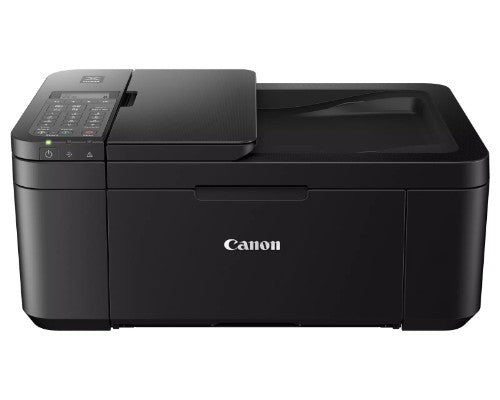
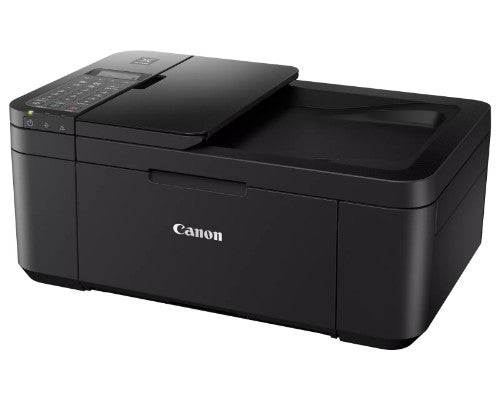
Compact, Versatile, Easy-to-UseFor all your work or home printing needs, the PIXMA TR4720 Wireless1 All-in-One Printer has you covered. Enjoy simple setup through the Canon PRINT Inkjet/SELPHY App2 and an easy to install 2-Cartridge hybrid ink system and front loading 100-sheet paper tray. Big on performance, the PIXMA TR4720 is equipped with Auto 2-Sided Printing, an Auto Document Feeder for multi-page scanning, and built-in Fax functionality. With a variety of connectivity options, you'll be able to do it all from your PC or mobile devices — plus, the PIXMA TR4720 is compatible with Canon apps for printing, scanning, creative projects and more. Simple, productive office and home printing in a compact size — that’s the PIXMA TR4720.
EASY SETUPEnjoy simple setup through the Canon PRINT Inkjet/SELPHY App. Download the app, connect to the printer, follow a few easy steps on the screen, and you’re ready to print wirelessly!
EASY TO INSTALLDesigned for easy ink cartridge installation and replacement, the PIXMA TR4720 only needs 2 cartridges to print documents and photos.
FRONT PAPER TRAYA fast and easy to load front paper tray with 100-sheet plain paper capacity reduces the need to refill paper as frequently.
DESIGNED FOR YOUR SPACEPIXMA TR4720 has a compact design, available in black or white, to fit your space at the office or at home.
EFFICIENT DOCUMENT PRINTING & SCANNINGScan up to Legal size multi-page documents efficiently with the Auto Document Feeder. And save up to 50% of your paper costs with Auto 2-Sided (Duplex) Printing for Letter size documents.
QUALITY DOCUMENTS & PHOTOSThe PIXMA TR4720 utilizes a hybrid ink system with pigment-based black and dye-based color for sharp black text and vivid color prints. Product quality documents, photos, and also borderless11 prints up to 8.5” x 11”.
SIMPLE PRINTER INTERFACEWith the 2-Line LCD display and simple buttons, easily adjust printer settings, make copies, and send faxes with the number pad. Receive a Document Removal Reminder on the display if you forget your original document on the scanner.
CANON PRINT APPPrint and scan photos or documents right from your mobile devices or cloud services with the convenient Canon PRINT Inkjet/SELPHY App.
CONNECT YOUR WAYPrint directly from your favorite iOS and Android™ devices without drivers or apps using AirPrint®3 and Mopria® Print Service4. Plus, print from connected cloud-based services through PIXMA Cloud Link2. The TR4720 also has voice-activated Smart Assistant Support for compatible Amazon Alexa and Google Home devices.
UNLEASH YOUR CREATIVITYGet creative with Canon with a variety of apps and programs. Use Easy PhotoPrint Editor5 to print collages, calendars, business cards, ID photos and more. With Creative Park App6 you can explore and print projects like crafts, decorations, and games. And create and edit posters with Poster Artist Lite7 for Windows PCs.
INK WHEN YOU NEED ITThe TR4720 is compatible with Canon’s Auto Replenishment Service and PIXMA Print Plan, to help save you time and unplanned trips to the store. Subscribe to get ink delivered to your door when you need it.
Specifications
| Features |
|---|
| Product colour |
Black |
| Print technology |
Inkjet |
| Printing |
Color printing |
| Copying |
Color copying |
| Scanning |
Color scanning |
| Faxing |
Color faxing |
| Duplex printing mode |
Auto |
| Market positioning |
Home & office |
| Duplex printing |
Yes |
| Duplex scanning |
Yes |
| Duplex copying |
Yes |
| Printing colours |
Black, Cyan, Magenta, Yellow |
| Duplex functions |
Copy, Print, Scan |
| Number of print cartridges |
4 |
| Performance |
|---|
| Print technology |
Inkjet |
| Printing |
Color printing |
| Copying |
Color copying |
| Scanning |
Color scanning |
| Faxing |
Color faxing |
| Product colour |
Black |
| Printing colours |
Black, Cyan, Magenta, Yellow |
| Duplex functions |
Copy, Print, Scan |
| Number of print cartridges |
4 |
| Duplex printing mode |
Auto |
| Market positioning |
Home & office |
| Sound pressure level (printing) |
56.5 dB |
| Display |
|---|
| Display |
LCD |
| Built-in display |
Yes |
| Printing |
|---|
| Print technology |
Inkjet |
| Printing |
Color printing |
| Print speed (black, normal quality, A4/US Letter) |
8.8 ppm |
| Maximum resolution |
4800 x 1200 DPI |
| Print speed (colour, normal quality, A4/US Letter) |
4.4 ppm |
| Duplex printing mode |
Auto |
| Duplex printing |
Yes |
| Copying |
|---|
| Copying |
Color copying |
| Maximum number of copies |
99 copies |
| Duplex copying |
Yes |
| Maximum copy size |
A4 |
| Scanning |
|---|
| Scanning |
Color scanning |
| Optical scanning resolution |
600 x 1200 DPI |
| Scanner type |
Flatbed scanner |
| Scan technology |
CIS |
| Duplex scanning |
Yes |
| Fax |
|---|
| Faxing |
Color faxing |
| Fax resolution (colour) |
200 x 200 DPI |
| Fax resolution (black) |
300 x 300 DPI |
| Input & output capacity |
|---|
| Total number of input trays |
1 |
| Total input capacity |
100 sheets |
| Total output capacity |
100 sheets |
| Paper handling |
|---|
| Maximum ISO A-series paper size |
A4 |
| Ports & interfaces |
|---|
| USB port |
Yes |
| Direct printing |
Yes |
| Network |
|---|
| Ethernet LAN |
No |
| Wi-Fi |
Yes |
| Wi-Fi standards |
802.11b, 802.11g, Wi-Fi 4 (802.11n) |
| Design |
|---|
| Product colour |
Black |
| Display |
LCD |
| Built-in display |
Yes |
| Market positioning |
Home & office |
| Power |
|---|
| Power consumption (standby) |
0.8 W |
| Power consumption (off) |
0.3 W |
| Power consumption (max) |
7 W |
| AC input voltage |
100 - 240 V |
| System requirements |
|---|
| Windows operating systems supported |
Windows 10, Windows 7, Windows 8.1 |
| Mac operating systems supported |
Mac OS X 10.12 Sierra, Mac OS X 10.15 Catalina |
| Mobile operating systems supported |
Android, iOS, iPadOS |
| Software |
|---|
| Windows operating systems supported |
Windows 10, Windows 7, Windows 8.1 |
| Mac operating systems supported |
Mac OS X 10.12 Sierra, Mac OS X 10.15 Catalina |
| Mobile operating systems supported |
Android, iOS, iPadOS |
| Operational conditions |
|---|
| Operating temperature (T-T) |
5 - 35 °C |
| Operating relative humidity (H-H) |
10 - 90% |
| Weight & dimensions |
|---|
| Width |
17.2" (436 mm) |
| Depth |
11.7" (297 mm) |
| Height |
7.48" (190 mm) |
| Weight |
12.7 lbs (5.76 kg) |
| Other features |
|---|
| Duplex printing |
Yes |